21 keer bekeken / views
Dividing a drawer seems simple… until you want to combine multiple compartment sizes.
Een Nederlandse vertaling van deze post kunt u hier vinden.
In this post I describe two Python programs that I wrote to create nice compartment layouts for my parts boxes.
- boxGenerator.py
- gridLayoutGenerator.py
Both generate OpenSCAD programs, but also directly usable .stl files for 3D printing.
This repository contains two scripts that take the puzzle work out of your hands:
- boxGenerator.py
- gridLayoutGenerator.py
boxGenerator.py
boxGenerator.py creates a free layout of rectangular compartments within a box.
You specify:
- dimensions of the box
- dimensions of the compartments
- number of compartments per type
The script tries to place those compartments within the available surface.
Interactive Prompt
The program works via an interactive prompt.
- First you enter the outer dimensions of the box to be printed.
- Then, for each desired compartment, you enter its size (length and width).
- Next, you specify how many compartments of this size you want and how many of these compartments should be printed directly adjacent to each other.
- Finally, you specify whether you want a preference for the placement of these compartments, for example: ‘random’, ‘top’ or ‘bottom’ of the box.
The script tries to place all compartments. If that fails, it indicates:
- which compartment does not fit
- or of which type fewer can be placed
Here you can see how this works in practice:
./boxGenerator.py
OpenSCAD box generator
----------------------
Select a project:
  [1] evenSpacers
  [2] ladeBox2
  [3] newProject
Choice [1-3]: 2
Project: ladeBox2

Enter outer box size (length x width x height, example: 300x200x80): 190x172x70 <Enter>
Enter inner wall height in mm: 68.8 <Enter>
Enter outer wall thickness in mm: 1 <Enter>
Enter inner divider thickness in mm: 1 <Enter>
Enter bottom thickness in mm: 1.2 <Enter>
Enter leftover compartment size (length x width, '-' = skip): <Enter>
Enter random seed [12345]: <Enter>
Enter number of layout attempts [120]: <Enter>
Enter number of attempts per cluster group [50]: <Enter>

Enter compartment definitions.
Example size: 25x30
Cluster size means how many equal compartments must touch each other.
Example: size 25x30, count 8, cluster 3 => groups of 3, 3, and 2
Empty size reuses the default size and still shows the remaining questions.
If no default exists yet, empty size finishes input.
Use 'keep' to reuse a default compartment without editing.
Use '0x0' to remove/skip a compartment and skip follow-up questions.

Compartment 1 size (length x width) (empty = default-size, 'keep' = default-all, '0x0' = skip): 190x55 <Enter>
Compartment 1 count: 2 <Enter>
Compartment 1 cluster size: 1 <Enter>
Compartment 1 preferred placement (random/front/back) [random]: <Enter>

Compartment 2 size (length x width) (empty = default-size, 'keep' = default-all, '0x0' = skip): 100x55 <Enter>
Compartment 2 count: 1 <Enter>
Compartment 2 cluster size: 1 <Enter>
Compartment 2 preferred placement (random/front/back) [random]: <Enter>

Compartment 3 size (length x width) (empty = default-size, 'keep' = default-all, '0x0' = skip): 80x50 <Enter>
Compartment 3 count: 1 <Enter>
Compartment 3 cluster size: 1 <Enter>
Compartment 3 preferred placement (random/front/back) [random]: <Enter>

Compartment 4 size (length x width) (empty = default-size, 'keep' = default-all, '0x0' = skip): <Enter>

Packing progress: attempt 1/120, best placed compartments 3/4, current missing compartments 3
Packing progress: attempt 10/120, best placed compartments 3/4, current missing compartments 3
Packing progress: attempt 20/120, best placed compartments 3/4, current missing compartments none
Packing progress: attempt 30/120, best placed compartments 4/4, current missing compartments none
Packing progress: attempt 40/120, best placed compartments 4/4, current missing compartments 3
Packing progress: attempt 50/120, best placed compartments 4/4, current missing compartments none
Packing progress: attempt 60/120, best placed compartments 4/4, current missing compartments 3
Packing progress: attempt 70/120, best placed compartments 4/4, current missing compartments 3
Packing progress: attempt 80/120, best placed compartments 4/4, current missing compartments none
Packing progress: attempt 90/120, best placed compartments 4/4, current missing compartments none
Packing progress: attempt 100/120, best placed compartments 4/4, current missing compartments none
Packing progress: attempt 110/120, best placed compartments 4/4, current missing compartments none
Packing progress: attempt 120/120, best placed compartments 4/4, current missing compartments none

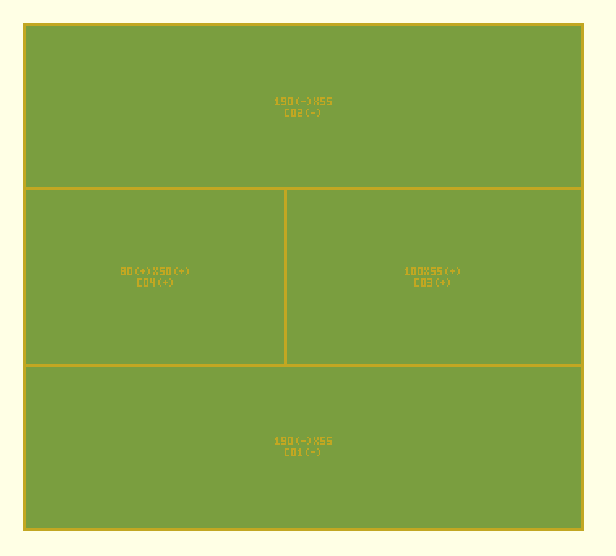
Placed cluster groups:
  group_1_1      position=(7.5, 0.0) footprint=180.5x55.0 cells=1 orientation=single pref=random/random
  group_1_2      position=(7.5, 115.0) footprint=180.5x55.0 cells=1 orientation=single pref=random/random
  group_2_1      position=(88.0, 60.0) footprint=100.0x55.0 cells=1 orientation=single pref=random/random
  group_3_1      position=(8.0, 55.0) footprint=80.0x50.0 cells=1 orientation=single pref=random/random

Requested cavities:
  requested_01 position=(0.0, 0.0) size=188.0x55.0
  requested_02 position=(0.0, 115.0) size=188.0x55.0
  requested_03 position=(88.0, 55.0) size=100.0x60.0
  requested_04 position=(0.0, 55.0) size=88.0x60.0

Remaining free cavities:
  None

Absorbed tiny gaps between requested cavities:
  adjustment_01 axis=y between=requested_01/requested_03 gap=5.000 growth=+0.000/+5.000
  adjustment_02 axis=y between=requested_04/requested_02 gap=10.000 growth=+10.000/+0.000

OpenSCAD file written: ladeBox2.scad
STL file written: ladeBox2.stl
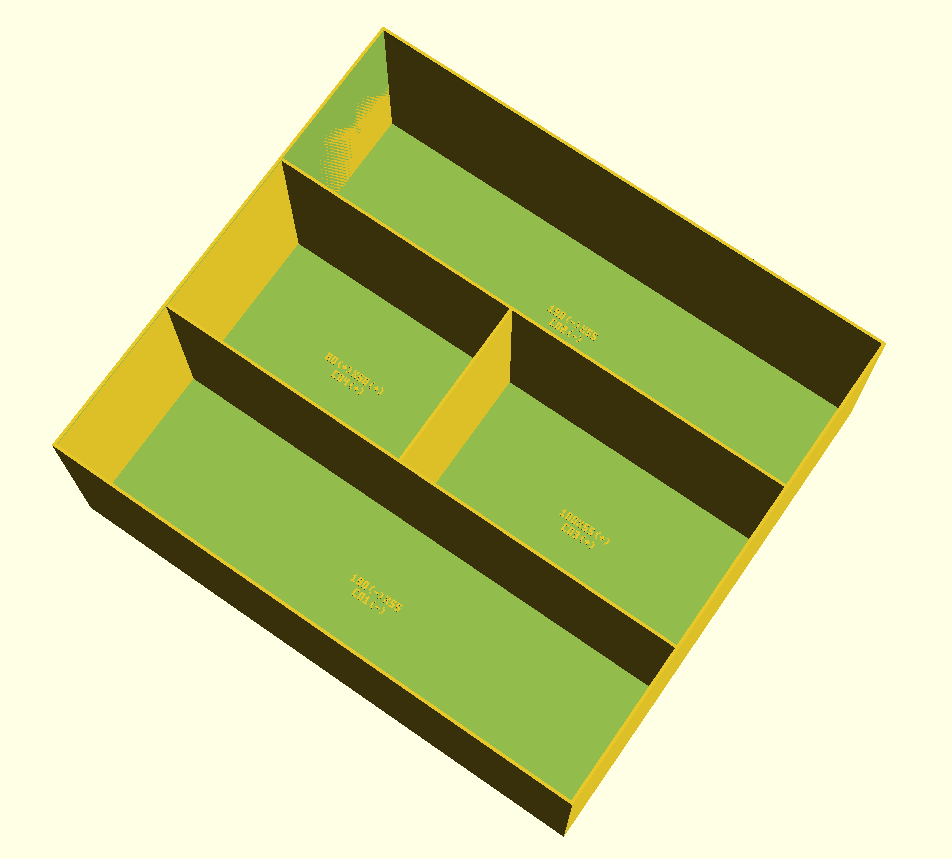
And below is the result:
gridLayoutGenerator.py
gridLayoutGenerator.py works with a fixed grid.
Inspired by Gridfinity, but without the overhead and therefore using less filament.
Everything is based on a grid size. All compartments are multiples of that.
This provides:
- clean alignment
- simple layouts
- predictable results
Three working modes
- fixed box length
Length specified
grid size and width calculated and selectable via a list - fixed box width
Width specified
grid size and length calculated and selectable via a list - fixed grid size
Box dimensions are multiples of the grid size and selectable via a list
Output
The program produces two output formats:
- OpenSCAD file
Can be viewed and modified in OpenSCAD
Then exported to STL - STL file
This file can be sent directly to a 3D printer
Interactive Prompt
The program works via an interactive prompt.
- First you choose which of the three modes you want to use.
- Then you enter the desired grid size (the grid is always square, so one value is sufficient).
- Then you specify the (outer dimension) your box should have. You will see a list of possible lengths and widths to choose from.
- Now, for each compartment, you specify how many “grids” it should consist of.
- Next, you specify how many compartments of this size you want.
The prompt looks like this:
python gritLayoutGenerator.py <Enter>

gridLayoutGenerator
-------------------
Select a project:
  [1] myLadeInlay
  [2] newProject
Choice [1-2]: 1 <Enter>
Project: myLadeInlay

Layout mode:
  [1] Fixed grid        (enter gridSize, then box dimensions)
  [2] Fixed box Length  (suggest gridSize and box Width)
  [3] Fixed box Width   (suggest gridSize and box Length)
Choice [1-3]: 1 <Enter>
Enter random seed (rngSeed) [12345]: <Enter>
Enter number of layout attempts [100]: <Enter>
Enter number of attempts per cluster group [50]: <Enter>
Enter gridSize in mm: 19 <Enter>
Axis values (gridSize multiples, 100..300): 114, 133, 152, 171, 190, 209, 228, 247, 266, 285
Enter complete outer box size in mm (LxWxH): 190x228x70 <Enter>
Enter outer wall thickness (outerWall) in mm: 1 <Enter>
Enter inner wall thickness (innerWall) in mm: 1 <Enter>
Enter bottom thickness in mm: 1.4 <Enter>
Enter inner wall height in mm: 70 <Enter>

Enter compartment requirements.
Use format NxM (examples: 1x1, 1x2, 2x6, 3x4)
Empty size reuses the default size and still asks for count.
If no default exists yet, empty size finishes input.

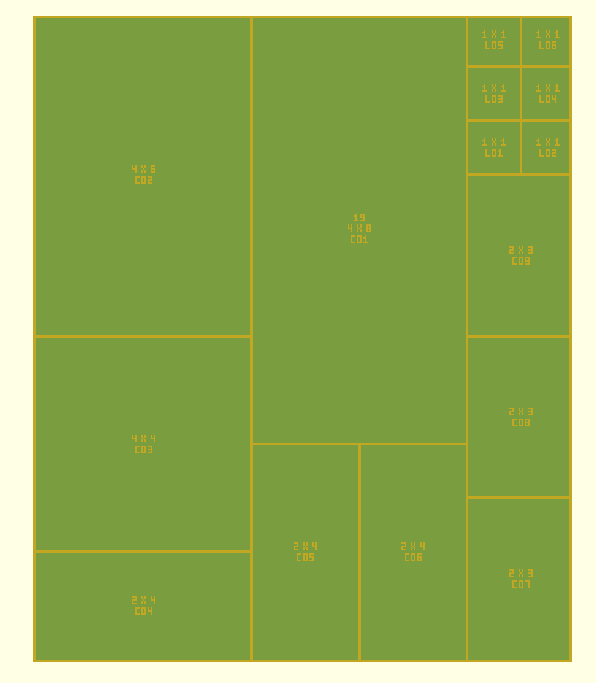
Compartment 1 size in grid units: 2x4 <Enter>
How many of 2x4: 3 <Enter>

Compartment 2 size in grid units: 4x4 <Enter>
How many of 4x4: 1 <Enter>

Compartment 3 size in grid units: 4x6 <Enter>
How many of 4x6: 1 <Enter>

Compartment 4 size in grid units: 4x8 <Enter>
How many of 4x8: 1 <Enter>

Compartment 5 size in grid units: 2x3 <Enter>
How many of 2x3: 3 <Enter>

Compartment 6 size in grid units: <Enter>

Packing progress: attempt 1/100, best placed compartments 9/9, current missing compartments -

Grid: 10 x 12 cells (120 total)
Placed compartments: 9
All requested compartments fit. Leftover 1x1 compartments added: 6
OpenSCAD file written: myLadeInlay.scad
STL file written: myLadeInlay.stl
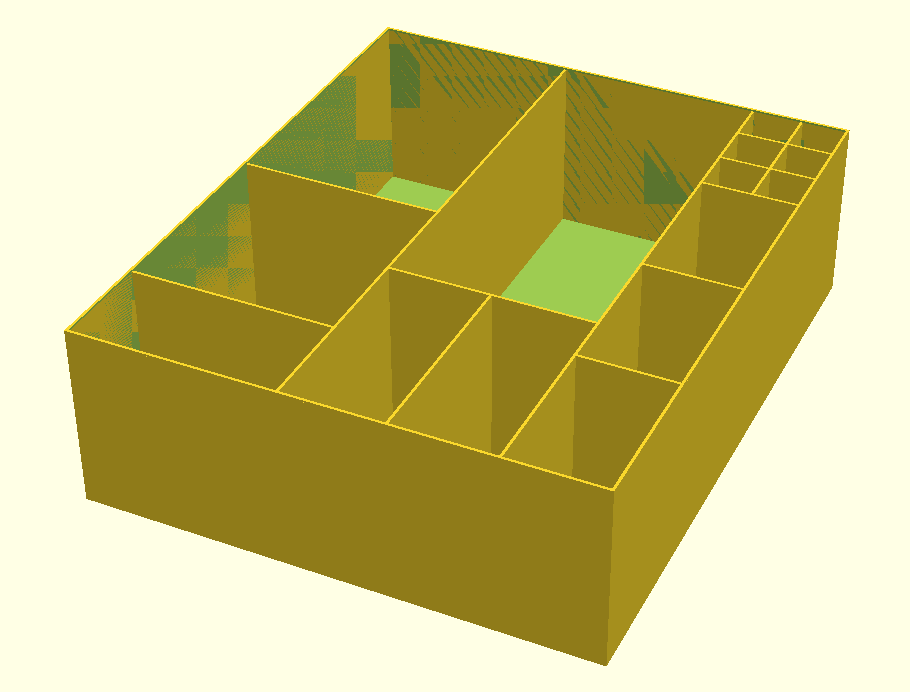
.. and this is the result:
 Follow